Boomerang vs Mailtrack: Why Freelancers Need a Better Tool
You sent the proposal on Tuesday. It is Friday morning. No reply, no acknowledgement, no calendar invite. Was it read? Was it forwarded to a partner? Did it land in spam? You search Gmail for the thread, find it buried under a week of newer mail, and you cannot remember whether you already sent a nudge or whether you meant to and got pulled into something else.
Most freelancers searching for help on this land on Boomerang or Mailtrack within their first ten minutes. Both are popular, both promise to fix the problem, and both leave gaps that get worse the longer you use them. The right tool for a solo professional is not the one with the most features; it is the one that does not require you to remember anything.
- Why the follow-up problem breaks solo workflows
- Where Boomerang's manual activation falls down
- The hidden cost of Mailtrack's free tier
- Why Streak and CRMs miss the point
- Four features a solo professional actually needs
- How Mail2Follow closes the gaps
- Tracking that respects the recipient
- Switching: what to expect
The freelancer’s follow-up problem
Consider a freelance interior designer in Barcelona who sent four proposals last month. One closed. Two went silent. The fourth replied three weeks later, apologetic, asking if the quote was still valid. The designer had already mentally written that one off and moved on.
The structural problem here is not laziness or poor sales hygiene. It is that an inbox is a stream, not a list. Proposals arrive at the top of attention the day they go out and slide down a screen’s worth per day after that. By Friday a Tuesday email is invisible. By the following Wednesday it might as well not exist.
A freelance translator running three jobs in parallel does not have the spare cognitive load to keep a mental Gantt chart of which client owes a response by which date. A reform contractor with five open quotes for next month’s projects cannot afford to drop one because the day got busy. The job-to-be-done is not “track everything”; it is “tell me the one thing I would otherwise forget”.
What Boomerang does (and where it breaks)
Boomerang has been around long enough that most freelancers have at least heard the name. The core idea is sound: write the email now, and Boomerang will bring the thread back to the top of the inbox on a date you pick. Scheduled send, inbox pause, and a “send later” button. Useful primitives.
The failure mode is the activation step. Every single send requires you to click the Boomerang button and pick a return date. Forget once and the thread is invisible until the client either replies or you happen to remember. For a freelance gestor handling fee schedules and engagement letters across a normal week, “remember to click the button” is exactly the kind of dependency the tool was supposed to remove.
Reply detection is the second gap. Boomerang’s bring-back works on a timer, not on the thread state. If a client replies on Wednesday and the return date is Friday, the email still resurfaces on Friday as a reminder to follow up on something that has already moved on. The designer who set a 5-day bring-back on Monday’s proposal and got a quick “thanks, reviewing” on Tuesday now has a Saturday morning ping prompting them to chase a client who is already reading.
None of this makes Boomerang a bad tool. Scheduled send alone justifies the install for many people. But for a solo professional whose entire workflow runs on quotes, proposals, and invoices, the manual activation plus the reply-blind timer means the tool degrades exactly when the workload is highest.
Mailtrack’s simplicity comes with a cost
Mailtrack went the other direction. Install it, and every email you send is tracked automatically. No buttons, no decisions. The free tier shows two green checkmarks in the thread when the recipient opens the message.
The hidden cost is the footer. The free tier appends a “Sent with Mailtrack” line to every outgoing email. A freelance architect sending a 12,000€ project brief to a hospital procurement office is now signing that brief with a third-party advertisement. The client sees it. The client knows they are being tracked. The professional veneer of the proposal absorbs a small dent that the architect did not consent to.
The free tier injects tracking into messages to lawyers, doctors, and government domains with no category awareness. A pixel inside a fee schedule sent to a regulated counterparty is a worse problem than a forgotten follow-up.
Mailtrack tells you the email was opened. It does not draft the follow-up, does not detect a reply that came through a different channel, and does not surface a reminder inside the thread. The open is signal without an action attached.
A “Sent with Mailtrack” line on a proposal to a new client tells that client two things you did not mean to tell them: that you use a free tool, and that you are tracking them. Neither helps you close.
The upgrade path resolves the footer but does not address the deeper gap: Mailtrack is a notification tool, not a workflow tool. It tells you something happened. It does not help you decide what to do next, draft what to send, or know when to stop chasing.
Why Streak and CRM-style tools are overkill
Streak takes the opposite approach. It turns Gmail into a CRM, with pipeline stages, deal records, and contact properties layered on top of the inbox. For a five-person sales team running a structured process, that scaffolding earns its keep.
For a solo translator or a one-person consultancy, it is friction dressed as productivity. The mental model a freelancer actually uses is not “deal in stage three of five”. It is “the proposal I sent the dentist on Tuesday”. Threads, not records. The moment the tool asks you to categorize, tag, and stage every conversation, you have added a maintenance job that competes with the actual work.
HubSpot and Salesforce are further down the same road. Both are built for a sales manager who needs to forecast next quarter’s revenue across a team. Neither is built for an electrician who needs to remember that the quote for the kitchen rewire went out eight days ago and has not been answered. The bill alone, often 50€ a month or more, makes the comparison absurd for a single sender.
What solo professionals actually need
Strip the category down to its load-bearing features and four things matter. Everything else is decoration.
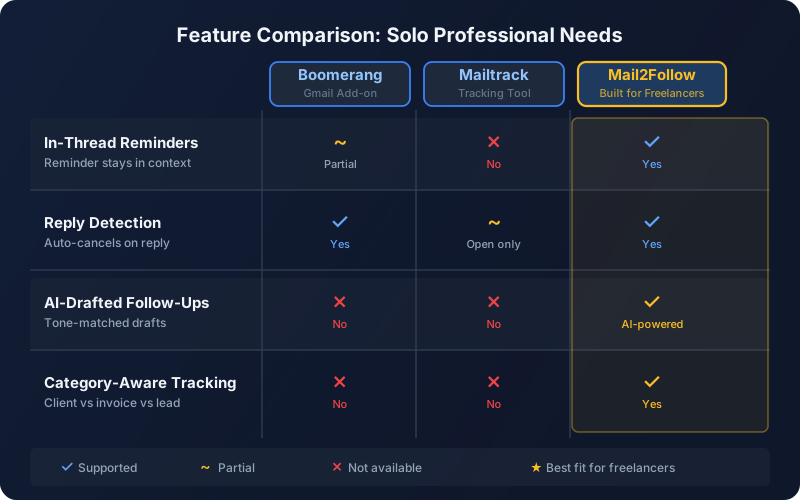
The reminder must surface inside the Gmail conversation it refers to. A separate tab, a separate inbox, a separate app: each one is a context switch that breaks the workflow. The thread is the unit of attention; the reminder belongs there.
When the client replies, the reminder must resolve itself. A timer-based bring-back that fires on Friday for a Tuesday reply trains the freelancer to ignore the tool. Reply detection is the difference between a system that earns trust and one that loses it.
The hardest part of a follow-up is not knowing it is due; it is knowing what to write. A draft that picks up the register of the original thread (formal with a notary, conversational with a recurring client) cuts the activation cost from ten minutes to thirty seconds.
If the tool tracks opens, it must know which domains to leave alone. Banks, healthcare, government, legal, education: pixels in those threads are a liability, not a feature. The decision belongs to the tool, made once, applied automatically.
Measured against this list, Boomerang covers in-thread reminders but fails on reply detection and tone-matched drafts, and does not track at all. Mailtrack covers tracking but fails on reminders, reply detection, and drafts, and has no category awareness. Streak covers tracking and a form of reminders but adds the pipeline overhead a solo operator does not need.
How Mail2Follow closes the gaps
Mail2Follow was built by Zinkforge specifically for the solo case. It lives inside Gmail, treats the email thread as the unit of work, and removes the steps Boomerang and Mailtrack still ask the user to do manually.
The workflow runs end to end inside the compose window:
- Open Gmail and write the proposal, quote, or invoice as you would today.
- Before sending, click the Mail2Follow toggle that sits above the body field. Pick a follow-up window (3, 7, or 14 days).
- Send the email. Mail2Follow reads the thread, classifies the intent (proposal, invoice, intro), and schedules the reminder.
- If the client replies, the reminder resolves automatically. You see nothing; the thread is closed.
- If the client does not reply by the chosen date, an in-thread reminder appears at the top of the conversation, with an AI-drafted follow-up already written in the tone of the original message. You read, tweak if needed, and send.
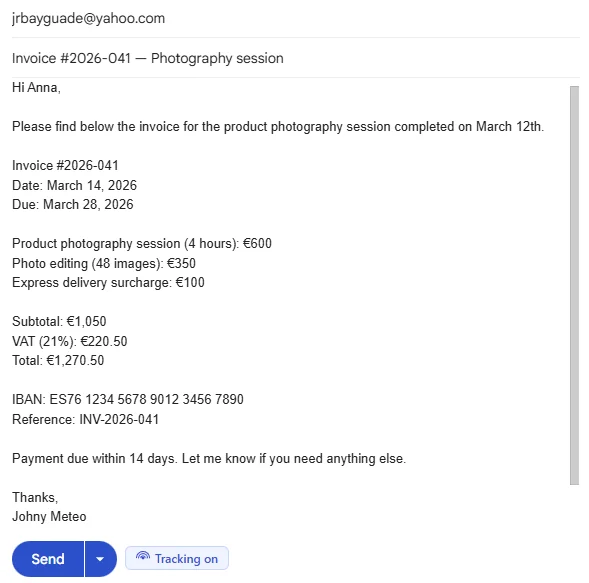
The draft is the piece most tools skip. A freelance illustrator chasing a 2,400€ invoice does not want to write the same diplomatic prose for the fifth time this quarter. Mail2Follow reads the original thread (subject, opening line, sign-off, register) and produces a draft that sounds like the same person who sent the first email.
Hi David,
“Wanted to circle back on the proposal I sent last week for the kitchen renovation. No pressure on timing, but happy to walk through any of the line items or adjust scope if it would help.
Let me know what works.
That draft writes itself in about three seconds. The reform contractor reads it, swaps a word, and sends. The reminder closes. The thread is back under control. No external dashboard, no pipeline stage, no “remember to click the button when you send”.
The privacy question: tracking done right
Open tracking has a deserved reputation problem. A pixel (a hidden 1x1 image used to detect when an email is opened) inside every send, regardless of recipient, is the failure mode most tools ship with. It is also why some freelancers refuse to use any tracker at all, even though the signal would genuinely help them.
The design choice for Mail2Follow was to make tracking category-aware by default. Before any pixel is injected at compose time, the extension checks every recipient against a sensitive-domain blocklist built from the Public Suffix List (a public list of internet suffixes that distinguishes institutional domains) plus a curated set of manual additions. Banks, healthcare providers, government, legal, and education domains get the email with no pixel. The follow-up reminder still runs; only the open signal is silenced.
A freelance accountant sending a fee schedule to a regional bank does not need to remember to disable tracking for that recipient. The decision is made once, in the product, and applied to every send. The same accountant emailing a long-time recurring client about a draft return gets the open signal that helps them know when to nudge.
Two other details matter. Open tracking is a Pro-tier feature; free users do not get the pixel, by design, so a new install does not silently start tracking before the user has even seen the setting. And every Mail2Follow user can disable open detection entirely, regardless of tier; the pixel never appears on any send when that toggle is off. The reminder workflow does not depend on opens. Reminders fire on calendar time, picked by the sender; opens are a side signal, not the trigger.
- Reminders fire on the date you picked, not on whether the recipient opened the email.
- Sensitive domains (banks, healthcare, government, legal, education) get no pixel, automatically.
- Open tracking is Pro-tier and individually disablable. It is a signal, not a dependency.
Making the switch: what to expect
The free tier of Mail2Follow is permanent and covers 15 tracked emails per calendar month. For a freelance designer sending three or four proposals a month plus the occasional invoice nudge, that cap is comfortable. The free tier includes AI classification, the tone-matched draft, reply detection, and in-thread reminders. What it does not include is the pixel and the full Insights view.
Most freelancers can start on the free tier and never feel pinched. The cases where Pro earns its $6.99 a month (or $59 a year) are predictable: when send volume crosses fifteen tracked emails a month, or when the open signal becomes useful for prioritizing which thread to revisit first. The 14-day trial is triggered by activation, not by install: once a user has tracked five emails and two weeks have passed since their first track, the next time they open the Insights tab the trial begins.
Do I need to uninstall Boomerang or Mailtrack first?
No. Mail2Follow runs alongside other Gmail extensions without conflict. Most users keep Boomerang’s scheduled-send feature and let Mail2Follow handle the reminder and draft workflow.
What happens to threads I am already tracking elsewhere?
Mail2Follow only tracks emails sent after it is installed and only when the toggle is active on that send. Past threads stay where they are; there is no migration step.
Will my clients see anything?
No footer on any tier. The free tier shows a small “Powered by Mail2Follow” line inside your own draft preview, not in the sent email. Pro removes that as well.
What if a client replies after the reminder has already fired?
The reminder resolves the moment the reply arrives in the thread, even if you have not opened Gmail yet. If the draft was already prepared, it is discarded automatically.
Free forever · 15 tracked emails / month · No credit card