Manage Clients From Gmail Without a CRM: Solo Pro Guide
A freelance illustrator with eleven active client conversations does not have a pipeline problem. She has a “which of these threads needs a reply today” problem. Her quotes, her invoices, and her in-flight projects all live in Gmail, where she also handles her tax accountant, her landlord, and the occasional newsletter. The advice she keeps hearing is to adopt a CRM. The advice keeps failing.
It fails for a specific reason: a CRM is built around pipeline stages, deal records, and contact properties, and a solo professional running 8 to 12 active relationships will never maintain that scaffolding. The real gap is not a missing database. The gap is a missing signal inside the email thread that tells you which conversation deserves your attention this morning. Gmail can be the system of record if you give it three things it does not have out of the box.
- Why CRM adoption fails solo professionals
- The three signals that actually matter
- Labels, stars, and Mail2Follow reminders together
- Setting up tracking at compose time
- Seeing every active thread in one place
- Optional Google Sheets archive via Zapier
- Pitfalls that break the system
- The inbox as system of record
Why CRMs fail solo professionals (and why you don’t need one)
The story is always the same. A freelance translator hits twelve concurrent clients, panics about losing a thread, and signs up for a CRM on a Tuesday evening. By Friday she has imported her contacts, created three pipelines, set up four custom fields, and sent two test emails through the tool. By the following Wednesday she is back in Gmail because that is where the new message from her biggest client landed, and the CRM has not been opened since.
This is not a discipline failure. It is a tool-fit failure. A CRM optimises for a sales team that needs a shared view across many salespeople, many deals, and many stages. A solo gestor running her practice from a kitchen table does not need a shared view. She needs to remember that the proposal she sent to the dental clinic on Monday has not had a reply yet, and that the invoice to the architecture studio is six days overdue.
When the tool’s mental model and the user’s mental model disagree, the user wins. She closes the tool.
A solo professional does not move clients from “Discovery” to “Proposal Sent” to “Negotiation”. She sends a quote, waits, sends an invoice, waits, and books the next conversation. Forcing those moments into named stages adds a maintenance burden with no payoff.
The CRM fills with two thousand contacts from a Gmail export, of whom maybe forty are active relationships. Searching becomes worse, not better, than searching Gmail directly.
”Last contacted date”, “deal value”, “industry vertical”: these fields look useful in a demo and rot the moment real work starts. The day the field is wrong is the day the database becomes a lie.
Every email gets copied, logged, or BCC-ed to the CRM. The solo professional is now doing two jobs (the work, and the bookkeeping about the work) instead of one.
What a solo professional actually needs to track
Strip away the CRM scaffolding and ask what signals actually drive a solo practice forward. There are three, and they are not pipeline stages. They are email states.
The first signal is the sent proposal waiting for a yes. A freelance designer sends a 4,500€ scope to a boutique skincare brand on Wednesday. Friday passes. Monday passes. Did they read it? Are they discussing it internally? Do they need a nudge? This is the most expensive signal to miss, because the cost of forgetting is the deal itself.
The second signal is the open invoice waiting for payment. A reform contractor finishes a kitchen renovation, sends the final invoice, and moves on to the next site. Three weeks later cash flow gets tight, he checks Gmail, and finds that the invoice email is buried under a hundred newer messages. The work is done; the money is just stuck.
The third signal is the unanswered question waiting for a reply. A freelance accountant asks her client for the missing receipts she needs to close the quarter. The client says “sure, I’ll send them this week” and disappears. Two weeks later she is the one looking late.
None of these are pipeline stages. They are time-based states attached to specific threads in Gmail. The job of the system is to surface those threads at the moment they need attention, not to model the business around them.
- Proposals sent and awaiting acceptance.
- Invoices sent and awaiting payment.
- Questions asked and awaiting an answer.
Everything else is noise dressed up as structure.
The three-layer Gmail-native system
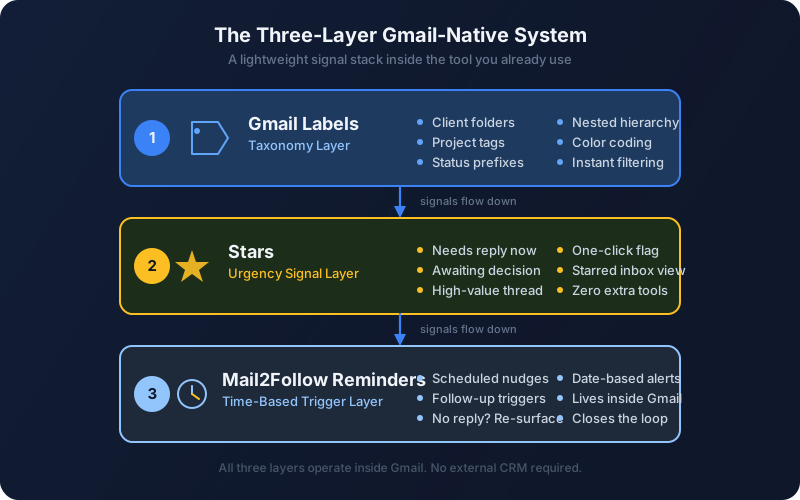
The system that replaces the CRM has three layers, each doing one job. Together they live entirely inside the tab the user already opens fifty times a day.
Three labels, no more: Proposals, Invoices, Open Loop. Applied at send time, removed when the thread resolves. This is the only categorical structure the system needs.
A yellow star means “needs attention this week”. The star is reserved, not promiscuous. Five starred threads is normal; thirty starred threads means the star has lost meaning and the system has broken.
Set at compose time on the email itself: nudge me in 3, 7, or 14 days if there is no reply. When the timer fires, the thread surfaces back in the inbox with a follow-up draft already written. When the recipient replies, the reminder cancels itself.
The reason this works where a CRM does not is that every layer is colocated with the work. The label is applied as the email is sent. The star is added (or removed) in the same gesture that reads the thread. The reminder is configured in the compose window, not in a separate planning tool. There is no “open the CRM” step, because there is no CRM.
A boutique branding studio with eight active client engagements can run the entire practice on this stack. Eight active threads is not a database problem. It is an attention problem, and attention is solved by surfacing things at the right time, not by storing them in fields.
Setting up Mail2Follow reminders at compose time
The reminder layer is where most ad-hoc systems fall apart. Stars and labels are static; they do nothing on their own. What turns the inbox into a working client-management system is the time-based trigger that brings a thread back into view at the moment it matters. This is the job Mail2Follow is built for.
The setup is one toggle in the Gmail compose window. There is no separate app to open, no second login, no contact record to create first.
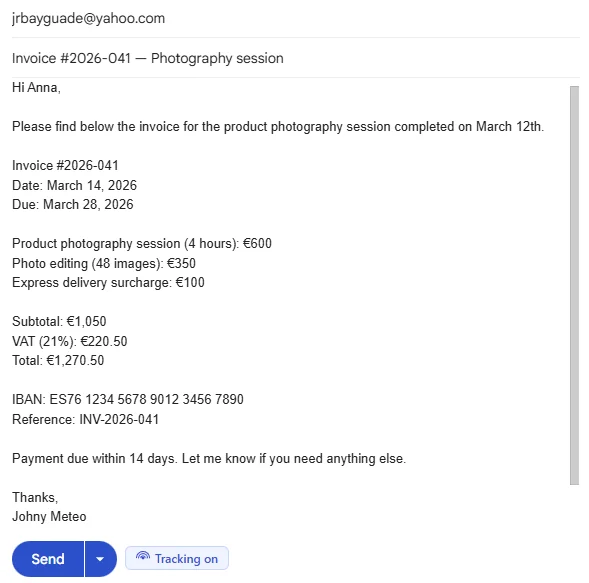
Here is the exact flow, step by step, for the freelance designer sending the 4,500€ scope:
- Open Gmail. Compose the proposal as usual. Apply the
Proposalslabel. - In the compose window, click the Mail2Follow tracking toggle. A small chip appears showing the suggested follow-up date (7 days is the default for proposals; 3 days for quick questions; 14 days for invoices).
- Adjust the date if needed. For a proposal where the client has already said “I’ll get back to you next week”, push the reminder to 10 days.
- Send.
- Forget about it. This is the important step.
Seven days later, if the client has not replied, the thread reappears at the top of the inbox with a follow-up draft already written in the tone of the original message. The designer reads it, edits one line, and sends. If the client did reply at any point in those seven days, the reminder cancels itself silently. No nudge gets sent on a thread that is already moving.
Hi Marta,
Just circling back on the scope I sent last week for the brand identity refresh. Happy to walk through any of the deliverables on a quick call if that would help, or to adjust the timeline if the launch window has shifted.
No rush, just wanted to make sure it didn’t get buried.
That draft is what appears when the reminder fires. The designer did not write it. She wrote the original proposal seven days ago and then went back to her actual work. The system did the remembering.
Tracking proposals, invoices, and follow-ups in one dashboard
Reminders solve the “surface this thread at the right time” problem. The other half of the problem is the “show me everything that is currently in flight” question, the one a solo professional asks on a Monday morning while drinking the first coffee.
The Mail2Follow dashboard answers it without leaving Gmail. It lists every active tracked thread, grouped by the label applied at send time, with the next reminder date visible per thread. A reform contractor opening Gmail on a Monday sees, in one glance: three quotes out (one due for a nudge tomorrow, two still inside their grace window), two invoices outstanding (one already past due, flagged), and one open question to his supplier.
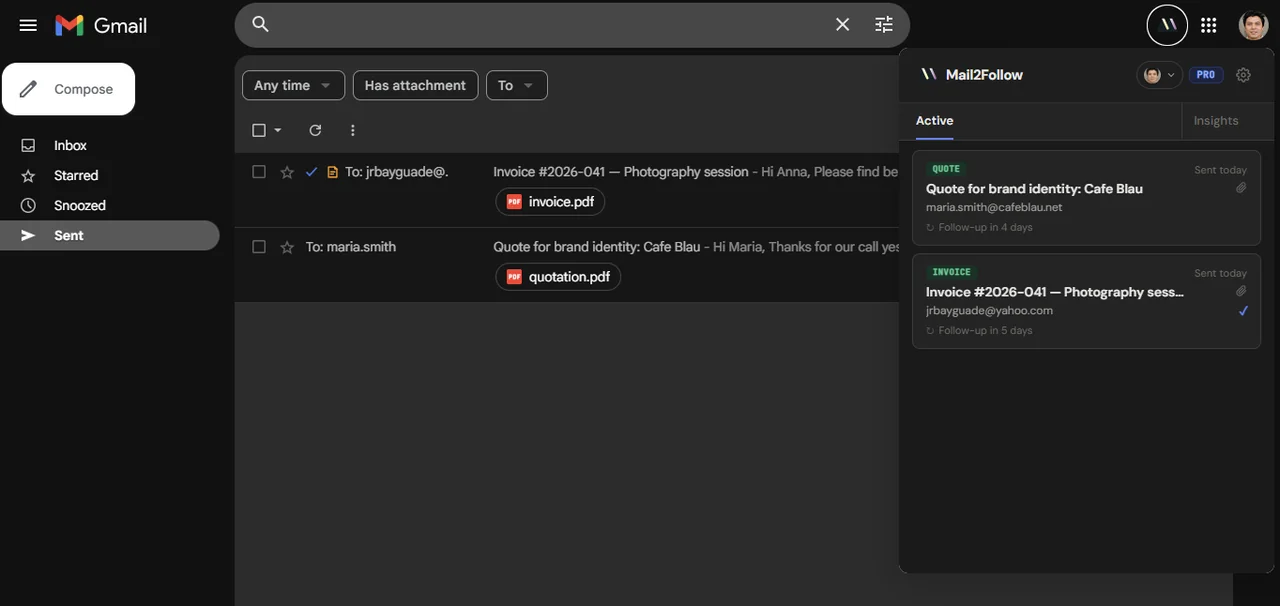
What makes this different from a CRM dashboard is what is NOT there. There are no deal values to maintain. No probability-to-close fields. No “next step” dropdowns. The only data is the thread itself and the date the system will surface it again. That is the entire model.
This matters because every field a tool asks the user to maintain is a field that will eventually rot. The dashboard works precisely because there is nothing to maintain. The thread exists in Gmail; the reminder exists on a timer; the dashboard is a view over both. Nothing has to be kept in sync because nothing was ever copied in the first place.
Pushing tracking data to Google Sheets (optional lightweight log)
The thesis of this post is that the inbox is sufficient. Most solo professionals will read everything above and stop there, which is correct. But two specific use cases push toward wanting a read-only archive: tax season, and the year-end conversation with an accountant who wants a list of which invoices were issued, paid, and chased.
For those cases, Mail2Follow’s Zapier integration pushes tracking events to a Google Sheet automatically. The sheet is the archive, not the working tool. The working tool is still Gmail.
The setup is one Zap: “When Mail2Follow tracks a new email, append a row to Sheet X”. The row holds the date sent, the recipient domain, the subject line, the label applied, and the resolution date (when a reply arrived or the user manually closed the thread). Nothing else. A freelance accountant looking at this sheet in February can reconstruct exactly which invoices went out in the previous quarter and how long each took to settle.
The distinction is what keeps the system from sliding back into CRM territory. The moment the sheet becomes the place where decisions are made (rather than the place where history is read), the system has failed and the inbox is back to being a notification layer for a database. Resist that drift. The sheet is write-once, read-rarely. The inbox is where the work happens.
A consultant who genuinely needs more than this likely has a real sales operation and a team. That is a different post.
Common pitfalls and how to avoid them
The three-layer system is simple enough to stick with, but it has three failure modes that recur. Each is recoverable; each is worth naming before the reader hits it.
I created 15 labels and now I can't find anything. What went wrong?
Over-labeling is the most common failure mode. The taxonomy is three labels, not fifteen. Proposals, Invoices, Open Loop. Resist the urge to add Proposals - Architecture, Proposals - Branding, Proposals - Q3 2026. Gmail search already handles those distinctions; what you actually need is the coarse-grained state. Delete the extras and merge the threads back into the three core labels.
I forget to enable tracking on outgoing emails. Then I lose the thread.
This is a habit problem, not a tool problem, but the workaround is straightforward: enable Mail2Follow’s default-on behaviour for outgoing mail, with the sensitive-domain blocklist filtering out anything sent to banks, healthcare providers, government addresses, or legal counterparties. Then the toggle becomes “turn off for this send”, which is the right default for a solo practice where almost every outgoing email is client work.
I started building a Notion CRM to complement Gmail. Is that fine?
It is the beginning of the end. The Notion CRM grows fields, then views, then templates, then automations. Six weeks later the user is back to maintaining a parallel database, which is the exact thing this system was built to avoid. If a project genuinely needs project-management scaffolding (deliverables, milestones, file storage), use a project tool scoped to that project. Do not use it as a shadow CRM.
I star everything because everything feels important.
Then the star means nothing. Cap starred threads at five at any given time. If a sixth thread becomes urgent, an existing starred thread has to either resolve or get demoted. The constraint is what gives the signal value. A boutique studio juggling eight active clients does not have eight urgent things on the same day; it has one or two.
What happens to the reminders when I'm on holiday?
They keep firing on their schedule, which is fine because nothing gets sent automatically. The reminder simply surfaces the thread; the user (you) decides whether to act. Pause the reminders manually before a two-week break if you want a clean inbox to return to, or just batch-process the surfaced threads on day one back.
Your inbox is your CRM, if you give it the right tools
The frame to leave with is this: the inbox is not a dumping ground for messages. For a solo professional, it is already the system of record for every client relationship that matters. The proposal lives there. The acceptance lives there. The invoice lives there. The “thanks, payment sent” lives there. The CRM was always trying to be a copy of the inbox, and the copy was always out of date.
What was missing was not a database. It was three small things bolted onto Gmail: a coarse taxonomy via labels, a sparing urgency signal via stars, and a time-based trigger that brings the right thread back into view at the right moment. With those three layers in place, an architect can run twelve active engagements, a freelance writer can juggle five magazines and two book projects, and a reform contractor can keep tabs on every open quote without ever leaving the tab where the work already lives.
The test of a system is whether you are still using it in six months. CRMs fail that test for solo practices because the maintenance cost exceeds the value delivered. The Gmail-native stack passes it because there is nothing to maintain. You send the email. The system does the rest.
Free forever · 15 tracked emails / month · No credit card