Tracking Open Proposals Without a CRM: The Spreadsheet Trap
You sent a proposal in February. It is April. The client never replied, and you never followed up, because the row in your tracking sheet got buried under fifty other rows and you stopped opening the tab in week three. The job went to whoever wrote a polite nudge on day seven.
This is the most common way solo professionals lose work, and it is not a discipline problem. It is a location problem. The tracking system lives in one place; the email it is supposed to track lives in another. Whichever one demands a context switch loses, every time, the moment real work picks up.
The architect’s spreadsheet
Consider a freelance architect in Barcelona, working solo, who decides in January that this is the year she finally tracks her presupuestos properly. She builds a Google Sheet on a Sunday afternoon. Columns for client, project, amount, date sent, follow-up date, status, notes. It is a good sheet. She is proud of it.
For three weeks she updates it after every send. Then a renovation project starts running long, a planning permission gets contested, a client demands revisions on a deadline, and the sheet quietly stops getting opened. Not because she forgot it existed. Because every time she would have updated it, she was already late for something else.
In April she sits down to do quarterly invoicing and realises two proposals from February were never followed up on. One client had gone with a competitor. The other had simply moved on; she could tell from the LinkedIn update.
She did not lack discipline. She lacked a system that did not require her to remember to use it.
Why the spreadsheet always goes stale
The tracking sheet fails for a reason that has nothing to do with the sheet itself. The proposal email lives in Gmail. The tracking record lives in a tab in another browser window, or in a Notion database, or in a paper notebook on the desk. Two locations, one workflow.
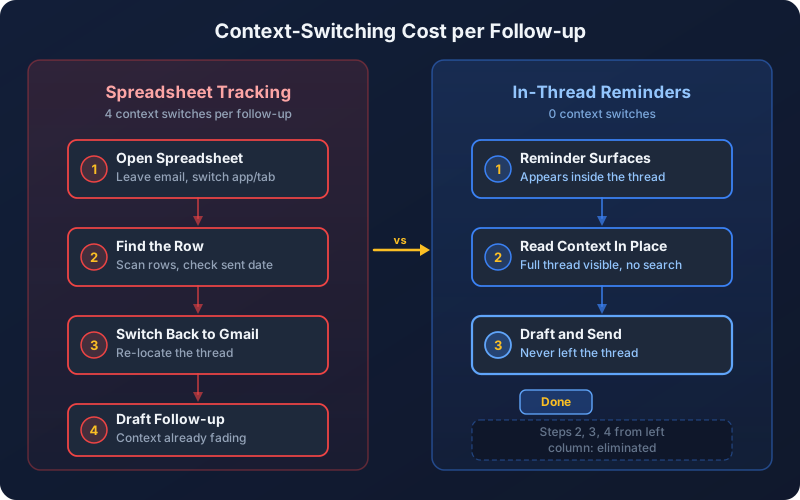
To follow up on a proposal, the architect has to: open the sheet, scan for the right row, check the date she sent, decide if it is time, switch back to Gmail, find the original thread, hit reply, draft the message, send. Eight steps, four of which are pure navigation between two systems that do not know about each other.
When the day is quiet, eight steps is fine. When the day is loud, eight steps is too many. So the follow-up gets postponed to “tomorrow”, and the sheet gets postponed to “next week”, and by month three the sheet is a fossil.
Compare this to a different design. The reminder surfaces inside the Gmail thread it is reminding you about. You open Gmail in the morning, you see “follow up on the Mendoza presupuesto, sent 7 days ago” sitting directly under the original email, you click reply, you draft, you send. Three steps, zero navigation. The system did not ask you to remember it; it inserted itself into the place you were already looking.
What open proposals actually cost
The architect’s two February proposals are not abstract revenue. One was a kitchen reform of meaningful size; the other a smaller bathroom job. Both went to competitors who followed up. Both clients had simply not received a reminder and had moved on to the firm that did remind them.
A freelance developer with five open project scopes in flight has the same problem in miniature: the one that gets won is usually the one the developer nudged on day five. A two-person translation agency with twelve quotes outstanding cannot tell which are still warm and which have gone cold, because the quotes are in twelve different threads and the tracking lives nowhere consistent. A gestor who has sent fee schedules to prospective clients in a quarter loses the ones she forgot to chase.
The proposals that win are not the cheapest or the best-written. They are the ones the client was reminded about while still in the decision window. That window is shorter than most independent professionals assume, and a proposal that goes cold inside it almost never reheats.
The email thread is the source of truth. The reply, when it comes, arrives there. A second system always drifts, and the drift always favours the urgent over the important.
Every extra column is a reason to not update the row. The tracker that gets used is the tracker that takes ten seconds to update, not three minutes.
Clients who like the proposal but get distracted by their own work will, in most cases, go with whoever wrote them back first. The default outcome of silence is loss.
For a solo professional, the follow-up is administrative hygiene, not pushy selling. A short, polite note seven days after a proposal is what professional service work looks like.
The three things you actually need to track
Most tracking templates suggest twelve columns: client name, contact email, phone, company, industry, amount, date sent, follow-up date, status, probability, notes, next action. This is what a CRM looks like dressed as a spreadsheet, and it fails for the same reason CRMs fail solo professionals: the maintenance cost exceeds the marginal value.
The minimal tracker for an independent professional needs three columns, and only three. Anything else is decoration that will not survive a busy week.
The date the proposal left your outbox. This is the only timestamp that matters for deciding when to nudge. Everything else (date created, date drafted, date discussed) is administrative noise.
A specific date, not a vague “soon”. Three days, seven days, fourteen days; pick once at send time, write it down, forget about it. The system surfaces the reminder on the day; you do not need to scan a list to find it.
Four states cover every proposal you have ever sent: waiting, replied, won, lost. Probability percentages are a fiction; status chips are not. A proposal is either active or it is closed.
The architect with twelve columns spends a minute and a half updating each row and dreads it. The architect with three columns spends ten seconds and does it without flinching. The difference is not effort. The difference is whether the system survives contact with a hard week.
Why tracking must live inside the email thread
The proposal email is the canonical record of the deal. The price you quoted is in it. The scope you described is in it. The client’s eventual reply, if it comes, will arrive in the same thread. The follow-up you eventually send will go out from the same thread.
Moving the tracking somewhere else creates a second source of truth, and the second source of truth always loses to the first. The sheet says “follow up Tuesday”; the thread shows the client already replied on Monday. The Notion database says “active”; the thread shows the client politely declined two weeks ago. Drift is the default state of any decoupled system run by one person.
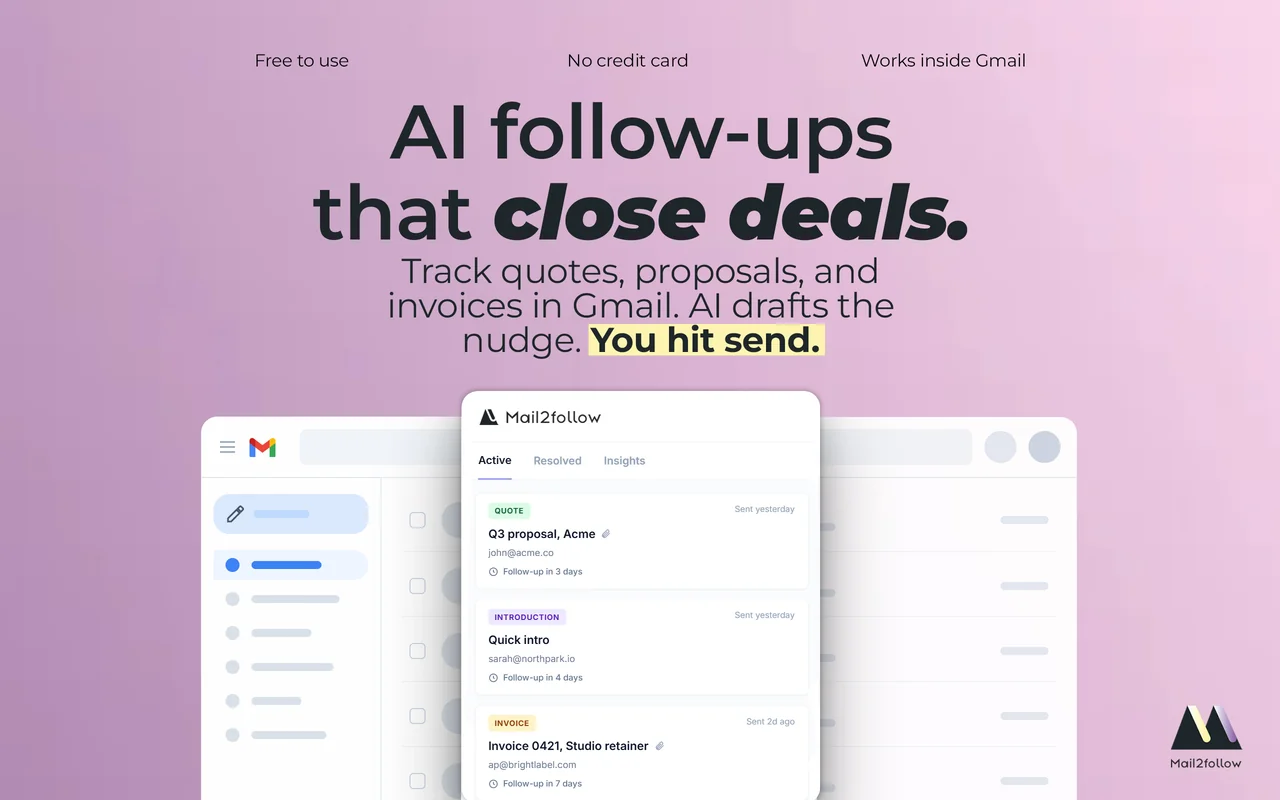
The fix is not a better external tracker. The fix is to put the reminder where the email already is. Mail2Follow takes this approach by design: when you send a proposal, you set a follow-up window at compose time, and on the chosen day the reminder appears directly inside the Gmail thread of the original email. When the client replies, Mail2Follow detects the reply and resolves the reminder automatically.
- One source of truth: the email thread.
- The reminder surfaces inside the thread, not in a dashboard.
- A reply closes the loop automatically, with no manual update.
- The tracker that does not require maintenance is the tracker that survives a busy month.
A workflow for five to fifteen proposals a month
The practical workflow has four steps, and only the first two require any thought from you.
Step one: send the proposal as normal. Before hitting send, pick a follow-up window. Three days for short-cycle work like a translation quote or a small repair estimate. Seven days for typical professional service proposals: an architect’s presupuesto, a developer’s project scope, a gestor’s fee schedule. Fourteen days for larger contracts where the client clearly needs internal discussion.
Step two: do nothing. The reminder is set. Go back to the project that was actually due today.

Step three: on the chosen day, the reminder appears inside the Gmail thread of the original proposal. Mail2Follow reads the thread context and produces a draft of the follow-up in your tone, pre-filled in the reply box. The draft references the original proposal specifically (not a generic “just checking in”), and matches the language and register of how you wrote the first email.
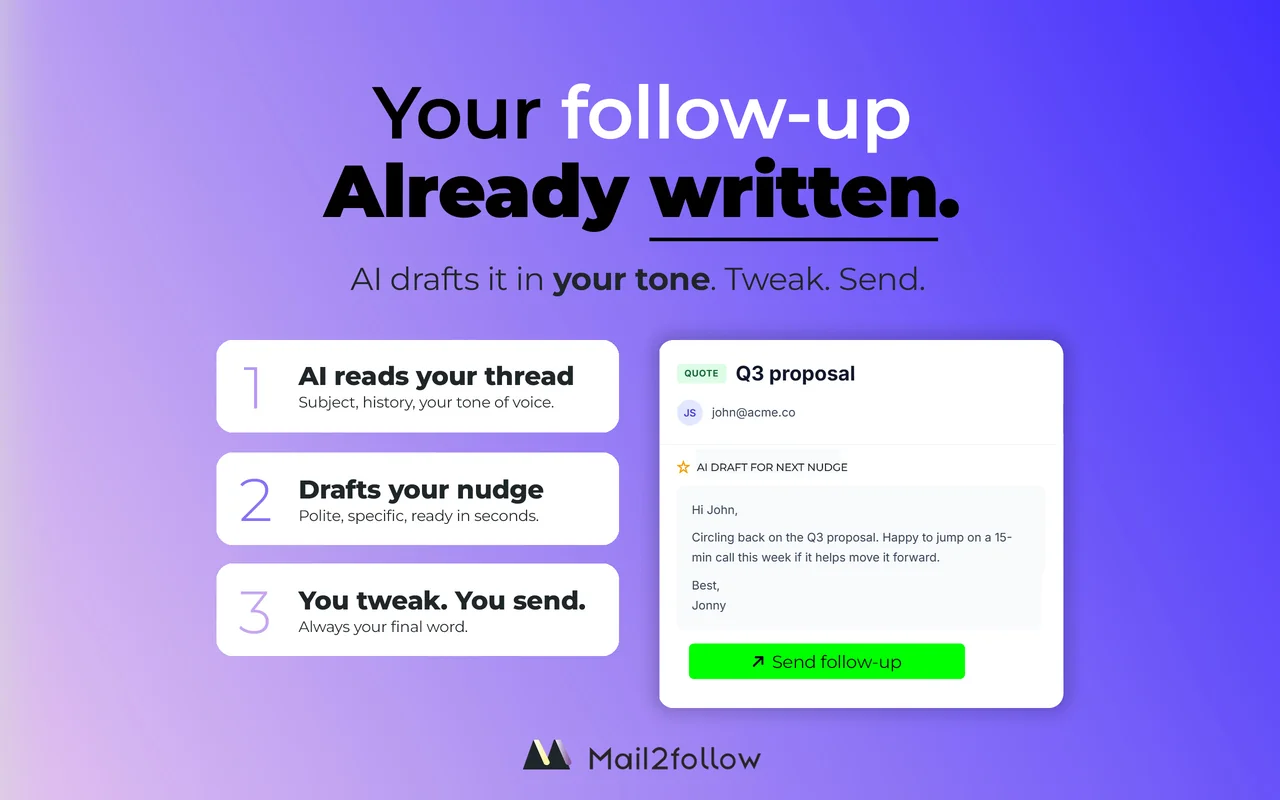
Step four: review the draft, edit anything that does not sound right, hit send. Total time, maybe forty seconds per follow-up. A solo professional sending fifteen proposals a month spends roughly ten minutes a month on follow-up administration, not the two or three hours a properly-maintained spreadsheet would consume.
A short example of what a tone-matched follow-up looks like for a presupuesto sent a week ago:
Hi Sergi,
Wanted to circle back on the presupuesto I sent last Tuesday for the kitchen reform. Happy to walk through any of the line items if useful, or to revise scope if there’s anything you’d like adjusted.
Let me know what works.
The same workflow holds whether the proposal is an architecture brief, a translation quote, a tax-year gestoría engagement, or a development project scope. The vertical changes; the system does not, because the system is “remind me where the email lives, and draft the reply in context”. That is all a solo professional needs.
Before you build another spreadsheet
There is exactly one question worth asking before you spend a Sunday afternoon designing your fifth proposal-tracker template, or signing up for a CRM trial, or buying a new project-management tool. Does the tracking live where the email lives?
If the answer is no, the system will go stale the first week the work gets hard. Not because you are undisciplined, but because every human running a one-person operation eventually triages anything that requires a context switch. The sheet that demands you open a second tab is the sheet that becomes a fossil by April.
The tracker that survives is the tracker that does not ask to be remembered. It surfaces inside the thread you are already reading, reminds you on the day you chose, drafts the reply you would have written, and resolves itself when the client writes back. The work the architect actually wanted to do, designing buildings, has room to happen, because the work of remembering who to follow up with stopped competing for her attention.
That is what tracking open proposals without a CRM looks like when it is done well. Not a better spreadsheet. A tracker that lives in the inbox.
Free forever · 15 tracked emails / month · No credit card